Have you ever upgraded to a shiny new pair of headphones, or a new sound card for your PC, only to be left wondering why the audio quality didn’t improve? Producing high quality sound from a computer is possible, but it’s easy to be misled in that one great piece of gear will be solely responsible for obtaining amazing audio quality. A digital signal from a computer needs a great DAC (Digital to Analog Converter) and amplifier to obtain the best analog signal for your headphones.
Let’s go through the sound production chain and see what is required to get the best audio quality possible on a computer:
Digital signal
 Computers only understand sound waves in digital form, a series of zeroes and ones. The sampling frequency determines how many samples there are per second. Each sample of that sound wave has a specific bit resolution. The sampling frequency and the sample bit resolution should both be high for better audio quality.
CDs store music in a high quality uncompressed audio format with a 44.1 kHz sampling rate and 16-bit resolution. To put things in perspective, a GSM phone audio signal is sampled at 8 kHz with 1.625 bits per sample.
Obviously, if you play a GSM phone conversation recording on a PC, you wouldn’t be able to make it sound good, even with the best DAC, amplifier and headphones. This is why knowing your audio source quality is the very first important step to getting better quality audio from your PC.
There are many audio encoding formats to choose from, but to summarize, there are three main classes of audio quality:
| Quality level | Format | Sample details |
|---|---|---|
| Mainstream | MP3, Ogg Vorbis | 44 kHz lossy up to 192 kbps |
| Enthusiast | MP3, Ogg Vorbis / ALAC, FLAC, CD | 44 kHz lossy 320 kbps / 44 kHz lossless 16 bit resolution |
| Audiophile | FLAC, ALAC | Lossless 96 kHz and above, 24 bit resolution and above |
Going from Mainstream to Enthusiast yields a noticeable audio quality improvement, while the next jump to Audiophile is a lot more subjective.
Thus, make sure you know what you’re listening to. For example, Spotify’s service bitrate varies from 96 kbps to 320 kbps, and an enthusiast quality level can only be unlocked by becoming a Premium subscriber. Audiophile quality will require sources with high sampling rate and bit resolution, from FLAC / ALAC files or even SA-CD discs.
Digital to analog conversion
 Now that you have a good quality source, the digital signal needs to be transformed to its analog equivalent and amplified to be played on the headphones. Stay on the safe side and get an external DAC to avoid electromagnetic interference. An audio chip integrated to the motherboard or on an extension card will inevitably pick up noise from the rest of the electronics in the PC.
External USB DACs, being outside of the PC enclosure, will usually perform much better. To make absolutely sure there is as little PC induced noise as possible, and usually as part of an audiophile setup, one can connect a standalone DAC that connects via optical S/PDIF TOSLINK to the computer. This way, the DAC is completely electrically decoupled from the PC and only the quality of the DAC unit will influence the analog signal generation.
Unfortunately problems don’t stop at electromagnetic interference. DACs rely on clocks to recreate an analog signal, and if the clock is off by even a tiny amount at every sample, the audio signal will suffer from jitter. Jitter makes the sound muddy, and distorts the higher frequency. The better the DAC’s design and components, the less jitter will be a problem, and the more expensive the DAC will be.
Analog signal amplification and headphones
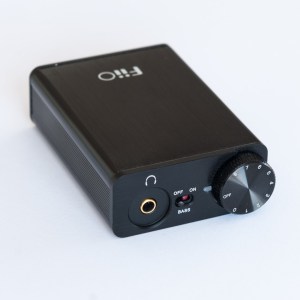 The analog output from a DAC is not powerful enough to be fed directly to headphones. The signal first needs to go through an amplification step.
During amplification, distortion should be minimal. Check the Total Harmonic Distortion values, they indicate how much a specific frequency is distorted. For best amplification result, the values should be lower than 0.01% for all tested frequencies.
The amplified signal should also ideally be noise free. Check the signal to noise ratio in the amplifier specifications. Try to get a signal to noise ratio over 100dB (Or noise to signal ratio less than -100dB).
Now we have to check the amplifier output impedance against the headphones impedance. Audio quality will suffer if the headphones impedance is low and the amplifier output impedance too high. The amplifier will have difficulties to drive the headphones loud enough. You will hear strong distortions at unpredictable frequencies and the bass will be less accurate. To avoid that issue, there is a good rule of thumb to follow. Make sure that the headphones impedance is at least eight times the amplifier output impedance. So an amplifier with an output impedance of 10Ω will be best paired with headphones over 80Ω. This is why picking an Objective2 or a FiiO E10K with their <1Ω impedance, allows for a great variety of pairing.
That said, you need to be careful if your headphones have an impedance of over 100Ω. You will need to pick an amplifier that is powerful enough to drive the headphones to satisfying listening levels.
Of course, the old adage of trying audio gear in a shop before buying is still true. This way, you will be able to ensure the pairing of amplifier/headphones is just right for you. But as this is not always possible, or should you prefer to shop online, here are a few recommendations from popular pairings:
Recommendations
We get a small referral fee for each purchase made that comes from the site. Please consider using the following links to help us keep this site up and running.
| Quality level | Amp/DAC | Headphones |
|---|---|---|
| Mainstream | your PC’s audio jack | Grado SR80e, Sennheiser HD518 |
| Enthusiast | Objective2, FiiO E10K | Shure SRH840, Sennheiser HD598, AKG K702 |
| Audiophile | DAC: Schiit Bifrost Amplifier: Schiit Valhalla 2 | Sennheiser HD800 |